~/writing/blue-green-router-swap
Swapping a live router in 50 milliseconds
Two VyOS VMs with identical MACs, a bridge with no ports, host-side tap moves, a seeded DHCP lease, and a dead-man switch. How a home router gets cut to a new release while the house sleeps.
The router is the one machine in the house that never gets rebooted on purpose. Mine is VyOS in a VM on a single Proxmox host: eight NICs, WireGuard, Kea for DHCP, a DNS forwarder, the firewall, NTP for the zones that are not trusted to reach the clock servers. In August it was on the stream release from March, kernel 6.6.128, five months behind on the box that forwards every packet in or out of the building.
The supported VyOS upgrade is add system image, then reboot: about ninety seconds of dark, plus a fresh DHCP client asking the ISP for an address as if the two had never met. ISP addresses on my line churn, and one given up in a reboot is unlikely to come back. So the question: can a home router upgrade like production? Prove the new release somewhere harmless, cut over in milliseconds, keep the WAN address, roll back automatically if anything is off. Two VMs, blue and green, same MACs.
Blue/green, briefly
Blue/green is an old web-deployment trick. You keep two complete copies of the service: blue takes live traffic, green runs the new version. Green proves itself somewhere it cannot hurt anyone, traffic switches over in one step, and blue stays warm for an instant rollback.
The rules
- Only one VM touches the real network at a time. Same MACs means the network can’t tell the two apart, so both attached at once would be an ARP argument. It’s a hard alternation, not a cluster.
- The config files diff to nothing. No per-VM addresses, no management interface. Every per-VM difference is one more thing to update during the minutes when nothing can be updated.
- Roles alternate every upgrade. The cold VM proves the next release, the swap happens, the old hot becomes tomorrow’s cold. One mechanism, reused forever.
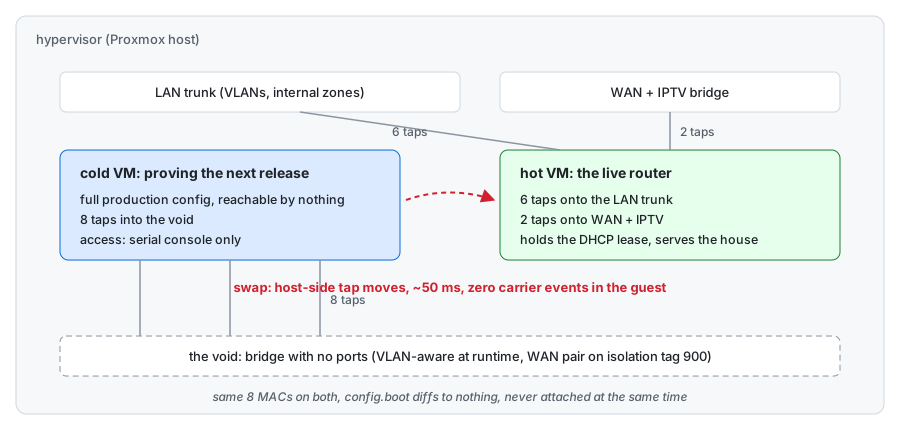
The void
The trick is a bridge with no ports: define one with bridge-ports none and attach a VM to it. The VM boots, runs its full production config, and can reach absolutely nothing. Access is the QEMU serial socket and a small driver script that types lines into it. That was also the first night the router had a console password, because until then the only way in was ssh, which requires the network the void exists to take away.
With all eight taps flat on one bridge, the cold router could hear its own DHCP server: Kea, running on the router, leased an address to the router’s own WAN interface. Harmless while isolated, fatal after a swap, because those lease files say the interface already has a valid address and they outrank anything the ISP says. The fix is to split the L2 inside the void: VLAN-aware at runtime, WAN and IPTV taps on an isolation tag that exists nowhere else, the other six untagged. The practical upshot: a DHCP server and its client must never share a broadcast domain, even when both are the same machine.
# a bridge with no ports: a place to boot a router where nothing can hear it
ip link set vmbr0 type bridge vlan_filtering 1   # runtime only, redo after host reboot

# the WAN and IPTV pair go on an isolation tag that exists nowhere else
bridge vlan del vid 1 dev tap103i0
bridge vlan add vid 900 dev tap103i0
bridge vlan del vid 1 dev tap103i1
bridge vlan add vid 900 dev tap103i1
Never touch the guest’s NICs
Proxmox offers two obvious tools for rewiring a VM: qm set --netN and link_down=1. Both flap carrier inside the guest, and VyOS reacts to carrier loss by stopping dhclient. The unit’s ExecStop runs dhclient -r, a DHCPRELEASE, and the ISP re-pools the address. And qm set hotplugs, about 0.8 seconds per NIC, eight NICs, every one a carrier event.
So the swap happens on the host, underneath the guest. Save the hot VM’s tap layout, detach its taps, move the cold VM’s taps onto the hot VM’s exact bridges and VLAN tags. From inside the guest there are zero carrier events: 2 to 5 ms per move, all eight NICs in about 50 ms. Packets in flight during the move are dropped; TCP rides through.
# hot's taps detached, cold's taps into hot's exact seats
for i in 0 1 2 3 4 5 6 7; do
    ip link set tap107i$i nomaster                          # hot: detached, zero carrier events
    ip link set tap103i$i master "${bridge[$i]}"            # cold: takes hot's exact bridge
    bridge vlan del vid "${void_vlan[$i]}" dev tap103i$i    # drop the void's tag
    bridge vlan add vid "${vlan[$i]}" dev tap103i$i         # take hot's exact tag
done
The lease
A DHCP client that starts while holding a lease file doesn’t DISCOVER, which risks any address the server feels like handing out. It REQUESTs the specific address it already had. That is INIT-REBOOT, and with the same MAC, while the server still holds the binding, it just ACKs. The cutover is an ordering:
- On the cold VM, stop dhclient while it holds no lease; stopping is releasing.
- Write the hot VM’s current lease files into the cold VM’s
/run/dhclient/, eth0 and eth1. - Move the taps, about 50 ms, zero carrier events.
- Start dhclient. It REQUESTs the live WAN address. The ISP ACKs in 40 ms.
# on the cold VM, over serial (repeat for eth1):
systemctl stop dhclient@eth0                        # safe ONLY while it holds no lease
cat seed_eth0.leases > /run/dhclient/dhclient_eth0.leases
# on the hypervisor:
bash swap-host.sh                                   # ~50 ms of tap moves
# back on the cold VM:
systemctl start dhclient@eth0                       # INIT-REBOOT: ACK in 40 ms
One constraint, the log explains why: never renew dhcp during a swap. And serial is slow, one to two seconds per line, so seed the lease files before the swap, never after.
The dead-man
VyOS has commit-confirm for exactly this: commit, and if nobody confirms within N minutes, revert. Over ssh it hangs, because the session that would do the confirming dies with the network being reconfigured. So the rollback lives outside the router, on the hypervisor:
systemd-run --on-active=180 --unit=swap-deadman /root/rollback-host.sh
# ... run the swap, run the checklist ...
systemctl stop swap-deadman.timer
It lives on the host that owns the taps, so the thing being reverted can’t reach it, and it fires unless a human disarms it after the checklist. The operating rule from that night: no revert, no dead-man, no button.
The operation log
Attempt one, 01:35. The script flapped the guest’s NICs with link_down and tacked a renew dhcp interface eth0 on the end: carrier loss stopped the live router’s dhclient, the stop sent a RELEASE, and the ISP re-pooled the address before the rollback finished. Six minutes of dark, and the pre-midnight address never came back.
Between attempts. Void split fixed, tap moves proven silent to the guest, lease seeding rehearsed, dead-man armed. The cutover itself was one command, run by a human:
ssh hypervisor 'bash /root/cutover.sh'Attempt two, 02:09. The swap took 50 ms. Then the lease seeds were typed into the new router over serial after the swap: thirty lines at one to two seconds per line, sixty-one seconds of WAN dark. The ACK came back in 40 ms once dhclient started. Dead-man disarmed inside its window; it never fired.
The checklist
Between the swap and disarming the dead-man: ssh answers and shows the new release; the WAN interface holds the same address from a fresh DHCPACK; the IPTV interface has its lease; DNS answers through the house resolvers and the router’s own forwarder; WireGuard peers handshake; the metrics agent reports; multicast interfaces exist; systemctl --failed is empty. One expected difference: the new release’s firewall chains carry 51 entries where the old had 45, an upstream change that splits connection-state policy per hook with the same semantics.
Teardown: shut the old hot down and flip its onboot; rewrite the new VM’s netN lines in the qemu-server config by hand, not with qm set (that hotplugs, see above); give the cold VM void lines so a future start can’t collide. Then sync the config into the cold VM while it is stopped: losetup -fP its disk, mount partition 3, copy the hot VM’s config.boot to boot/<image>/rw/opt/vyatta/etc/config/config.boot for every image directory present, byte for byte. Prove identity on both sides:
show configuration commands | grep -v hw-id | sort | sha256sum
# 420 lines, identical hashes, or whatever you have is not a standby
Why rolling
The stream is a snapshot and the distance grows: this upgrade jumped the kernel from 6.6.128 to 6.18.44 plus five months of fixes on the border. The LTS branches went private upstream, so rolling is the public lineage now. And I have a patch in VyOS: commit-confirm learned a no-prompt flag so it can be armed from scripts. On stream, what I fix upstream arrives here months later; on rolling, the things I fix are the things I run. Next step is a small build farm: nightly images, a smoke gate in a lab VM, a known-good shelf, and this swap as the deploy step.
The result
The router now upgrades the way the services behind it pretend to: prove cold, swap taps, keep the address, auto-revert when wrong. The next cycle should cost about one second of WAN dark.
The metric that matters at home is not uptime percentage; it is WAF, the wife approval factor: the network should never be something anyone else in the house notices. Attempt one failed it for six minutes. Attempt two passed it: the house slept through the whole thing, and the only person who knew the router had changed identities mid-flight was the one writing this.
The tuition was paid once, in two installments: six minutes for attempt one, sixty-one seconds for attempt two, both failure modes since deleted from the script. Every rolling update from here gets vetted on the cold VM at my pace, then shipped as a checklist and a 50 ms tap move on my schedule. The release calendar stopped being the router’s problem.